ChargePK Is Now on Apple CarPlay and Android Auto
Every public charger in Pakistan now lives on your car’s own screen. ChargePK runs natively on both Apple CarPlay and Android Auto, and as far as we know it is the first and only Pakistani EV app on either, let alone both. Same free app, nothing extra to buy: plug the phone in, and the chargers follow you onto the dashboard.
On CarPlay
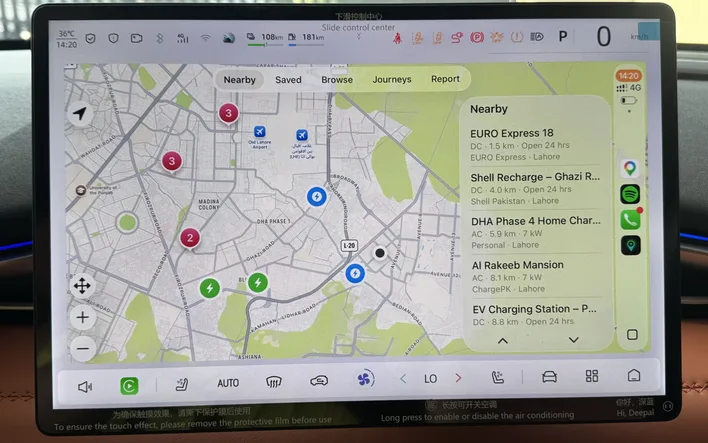
The photo above is not a mockup; it is ChargePK on a Deepal’s screen in Lahore. CarPlay gets the full in-car experience across five tabs: Nearby ranks live stations around you with distance, AC or DC, power and opening hours; Saved keeps your regular stops one tap away; Browse covers the whole map; Journeys carries your planned trips with their charging stops; and Report lets you flag a problem without touching the phone. Tap any charger and the car takes over navigation.
On Android Auto
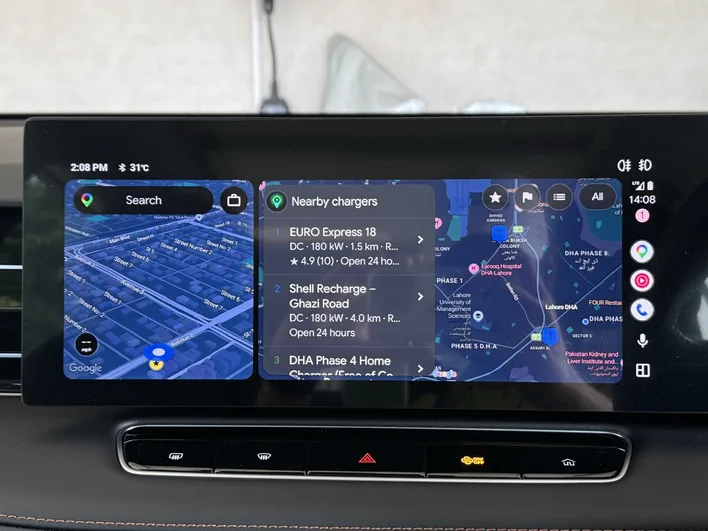
Android Auto gets the same brain in Google’s split-screen world: the nearby charger list runs alongside Maps, each station showing its distance, DC power, driver rating and whether it is open right now. One tap hands the destination to navigation. Everything you see is the same live data as the phone app, prices and availability included.
How to get it on your screen
- CarPlay: install ChargePK for iPhone, connect to the car (cable or wireless, whichever your car supports), and the ChargePK icon appears on the CarPlay home screen automatically.
- Android Auto: install ChargePK for Android, connect to the car, and ChargePK shows up in the Android Auto app launcher.
- No settings to hunt for, no separate download, no payment. If it does not appear, update the app to the latest version and reconnect.
Why this matters in Pakistan
Charging decisions happen while driving: range dropping, next stop unclear, one charger open and another one down. Pulling over to poke at a phone is exactly the wrong moment for a small screen. The car display puts the decision where your eyes already are, with the same live prices, reliability signals and day-wise hours the community keeps current. Deliberately, the attention-heavy things, check-ins, reviews, community posts, stay on the phone for when you are parked.
Put every charger on your dashboard
Free on iPhone and Android, with CarPlay, Android Auto and Apple Watch included. One download, every screen.
Download on the App StoreFrequently asked questions
Does ChargePK work with Apple CarPlay?
Yes. Install ChargePK on your iPhone, connect the phone to a CarPlay car, and the ChargePK icon appears on the car screen automatically, wired or wireless, whichever your car supports. You get the nearby charger list, saved stations, browse, journeys and reporting, right on the dashboard.
Does ChargePK work with Android Auto?
Yes. With ChargePK installed on your Android phone, the app appears in the Android Auto launcher when you connect to the car. The car screen shows nearby chargers with distance, DC power, ratings and opening hours, and taps straight into navigation.
Do I need a special version of the app for the car screen?
No. It is the same free ChargePK app from the App Store or Google Play. CarPlay and Android Auto support is built in, so if the app is on your phone, it is on your car screen. No extra purchase, no separate download.
Which cars support it?
Any car with Apple CarPlay or Android Auto, which covers most EVs sold in Pakistan and a large share of recent petrol cars. If your car shows other CarPlay or Android Auto apps today, ChargePK will appear alongside them.
What stays on the phone?
Actions that deserve full attention, such as check-ins, reviews, community posts and account settings, stay in the phone app. The car screen focuses on the driving decisions: which charger, how far, how fast, and how to get there.